كيف قمت بأتمتة قناة YouTube Shorts الخاصة بي باستخدام الذكاء الاصطناعي وأتمتة العمليات الروبوتية
كريستين ويليامز
إضافة الترجمة تعطي العلامات التجارية والمبدعين السيطرة الكاملة على كيفية تقديم رسالتهم للعالم. الترجمة النصية، والتعليق الصوتي، والترجمة - كل ذلك في أداة واحدة لتسريع سير عمل الفيديو لديك.
مرحبًا، أنا كريستين، وفي مارس من هذا العام بدأت رحلة جريئة - أتمتة قناة يوتيوب شورتس باستخدام الذكاء الاصطناعي وأتمتة العمليات الروبوتية. الفئة؟ قصص الحيوانات التي تم إنشاؤها بواسطة الذكاء الاصطناعي. لماذا هذه الفئة؟ لأن الحيوانات تتفاعل عاطفيًا مع الجمهور، وفي عصر المحتوى القصير، يقود الاتصال العاطفي المشاهدات والمشاركة.
لكن وكانت هناك مشكلة كبيرة واحدة: إنتاج الفيديوهات يدويًا هو مصدر إهدار للوقت. الحصول على اللقطات، التحرير، والنشر يستغرق ساعات لكل فيديو. هنا قررت أن أذهب بالكامل نحو الأتمتة.
خلال عطلة مايو، وثقت عملية الأتمتة الكاملة الخاصة بي. في هذه المدونة، سأرشدك من خلال:
استراتيجيتي في الأتمتة من النهاية إلى النهاية - من العثور على فيديوهات مرجعية إلى توليد الأصول البصرية النهائية.
كيفية استخدام نصوصي - مع إرشادات خطوة بخطوة، حتى تتمكن من تنفيذ أو تعديل النظام لاستخدامك الخاص.
هذه الإطار لا يعمل فقط لمحتوى الحيوانات. اتقن هذه العملية، وستتمكن من تطبيقها عبر مختلف فئات فيديو الذكاء الاصطناعي.
الاستراتيجية الأساسية: إعادة الإبداع، التكرير، والأتمتة
دعنا نكون صادقين – طريقة إنشاء الفيديو الخاصة بي مستوحاة من أفضل العروض في مجالي. لكنني لا أكرر؛ أحلل، فكك، وأعد إنشاء مع تحسينات.
يتكون المسار من 7 خطوات رئيسية:
تحديد أفضل مقاطع الفيديو القصيرة كمرجع
تحليل تلك الفيديوهات إلى إطارات قصة
كتابة مطالبات الذكاء الاصطناعي لكل إطار (توليد الصور)
تعديل العناصر في المطالبات لإنشاء نسخة فريدة
توليد الصور لكل إطار
كتابة مطالبات توليد الفيديو لتلك الصور
جمع كل شيء معًا في محرر
الخطوتان 5 و7 ليستا أوتوماتيكتين بالكامل بعد، لكن الباقي؟ يتم التعامل معه بالكامل بواسطة RPA (أتمتة العمليات الروبوتية) باستخدام Automa في Chrome، بما في ذلك تعدد المهام عبر متصفحات بصمات الأصابع.
تحليل خطوة بخطوة
1. مصادر فيديوهات مرجعية
تقوم السكربت الخاص بي بسحب البيانات من مقاطع فيديو YouTube Shorts باستخدام مفتاح ساخن واحد (Ctrl + Alt + S)، ويدعم كل من الفيديوهات الفردية والقنوات الكاملة. تذهب البيانات مباشرة إلى جدول بيانات، مما يوفر الوقت والنقرات.
⚠️ نصيحة محترف: استخدم حساب ثانوي لجمع البيانات بكميات كبيرة لتجنب المخاطر.
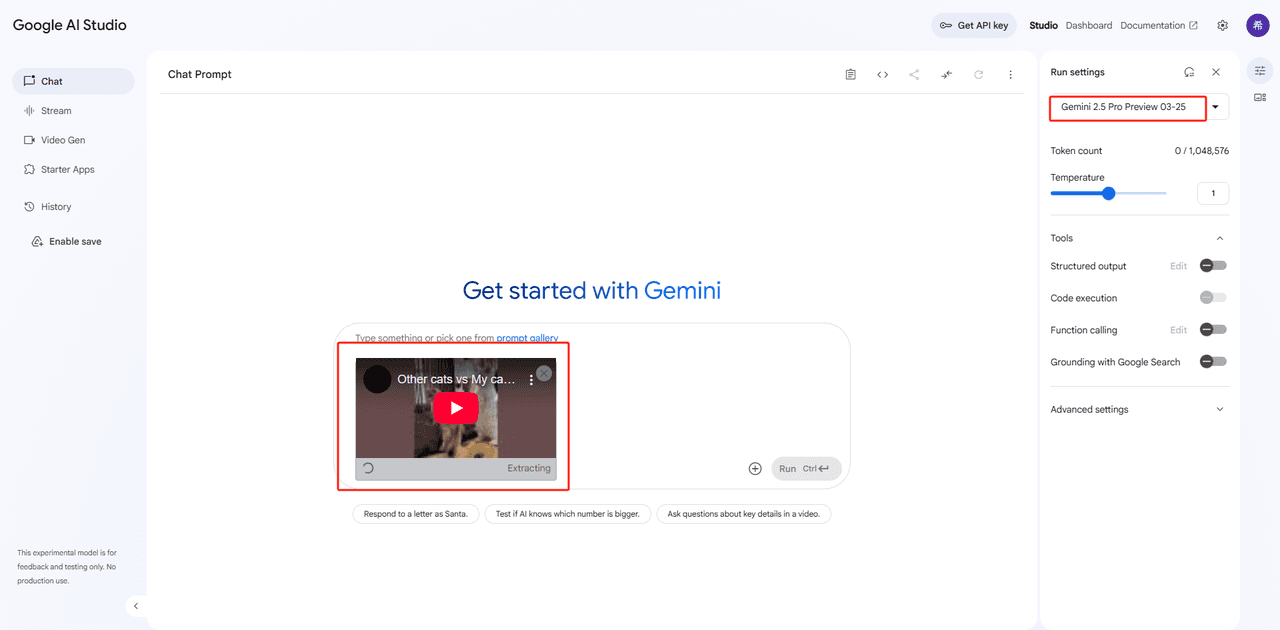
2. استخراج القوائم باستخدام Gemini 2.5 Pro
أستخدم استوديو الذكاء الاصطناعي من Google مع Gemini 2.5 Pro لتقسيم الفيديوهات إلى مشاهد. يقوم بتحليل الصور ويولد مطالبات إطار بإطار لتوليد الصور.
في القائمة المنسدلة أعلى اليمين، اختر Gemini 2.5 Pro (تجريبي فلاش) أو أحدث نموذج متاح.
🔒 إذا كنت محجوزًا عن تحليل فيديو YouTube مباشرة، استخدم ملحق المتصفح أو الأداة (مثل 4K Video Downloader) لحفظ الفيديو محليًا، ثم قم بتحميل الملف مباشرة إلى Gemini.
خطوة 2: تحميل الفيديو الخاص بك إلى Gemini
الخيار أ: استخدام رابط YouTube
الصق عنوان URL لمقطع فيديو YouTube Shorts متاح للجمهور.
الخيار ب: تحميل ملف
إذا كان الوصول الخارجي محظورًا، انقر على أيقونة المشبك 📎 لتحميل ملف فيديو محلي.
لضمان إخراج عالي الجودة مع Dreamina (مولد الصور)، أستخدم هيكل مطلب مصقول:
زاوية الكاميرا، إعداد المشهد، وصف الشخصية الرئيسية، الإجراء، تعبير الوجه، الشخصيات الداعمة، الخلفية، وقت اليوم، إلخ.
يضمن هذا الهيكل الوضوح لنموذج الذكاء الاصطناعي والاتساق عبر الإطارات.
الحقل
الوصف
مثال
زاوية الكاميرا
وجهة النظر (مثل، عرض جانبي، زاوية منخفضة)
"زاوية جانبية"
بيئة الشخصية الرئيسية
أين هم
"على حافة جرف ممطر"
وصف الشخصية الرئيسية
السمات الجسدية
"رجل يرتدي تي شيرت أبيض وجينز"
الإجراء الرئيسي
ما يفعلونه
"يمسك بطفل يبكي"
تعبير الوجه
العاطفة، رد الفعل المرئي
"تعبير غاضب"
الشخصيات الداعمة
اختياري: من يوجد أيضًا
"شرطي يجري نحوهم"
الإجراء الداعم
ما يفعلونه
"يصرخ"
التعبير الداعم
عاطفتهم
"جاد"
الخلفية
الإعداد وراء الشخصيات
"شلال وجبل ضبابي"
تفاصيل إضافية
التأثيرات المرئية أو الجو
"أمطار غزيرة، أمواج تتصادم"
وقت اليوم
متى يحدث ذلك
"عند الغسق"
3. إعادة كتابة المطالبات لتجنب الانتحال
هل تريد التأكد من أن نسختك أصلية؟ لقد أنشأت مساعد Gemini ثاني يقوم بتعديل الشخصيات الأساسية، المواقع، وعناصر القصة - مع الحفاظ على حبكة العاطفة.
على سبيل المثال، يمكنك تحويل مشهد مع كلب بوميرانيان ينقذ طفلاً على شاطئ عاصف إلى مشهد مع كلب جولدن ريتريفر في مدينة غارقة. تبقى الحبكة، لكن الإعداد البصري يتغير - مما يجعله قابل لإعادة الاستخدام عبر مواضيع متعددة.
📘 مجموعة التعليمات النهائية لـ Gemini: تعديل مطالبات القصة
Prompt Editing Guidelines(Simplified andLocalized)1.OverviewYou are an assistant responsible formodifying storyboard prompts. Yourjob is to replace specific characters(e.g.,protagonist,animal,villain)or environments(e.g.,cliff,forest)based on user instructions,whilekeeping the story intact.
2.CorePrincipleDo not change the core narrative. Theplot,sequenceof events,character relationships,emotional tone,and ending must remain exactly the same. Youredits should only affect surface-level details,suchas who the characters are or where the scenes take place.
3.InputFormatYou will be given a list of prompts,typically numbered(e.g.,"Prompt 1","Prompt 2",etc.). Eachprompt is a Chinese-language paragraph describing a visual scene.
4.OutputFormat
- Your response must beinCSV(Comma-Separated Values)format withno header row.
- Each line must contain two fields:(1)Shot number(e.g.,1,2,3...)(2)The modified Chinese promptas a natural-language paragraph.
- The paragraph must be enclosedinEnglish double quotation marks(" ").
- The prompt structure should follow this format:[Camera Angle]. [Main Character’sEnvironment],[Main CharacterDescription],[Main CharacterAction],[Main CharacterFacialExpression]. (Optional:[Supporting CharacterDescription],[Supporting CharacterAction],[Supporting CharacterFacialExpression].)[Background Description]. [Additional VisualElements]. [Time of Day].
- Use periods to separate major blocks of visual information.
- Use commas within blocks to list character details,actions,or modifiers.
- If a particular category(e.g.,facial expression,supporting characters)doesn’t apply to a scene,omit it without leaving blank fields.
5.CharacterReplacement Rules5.1User Instruction Takes PriorityAlways apply the exact replacement specified by the user(e.g.,“Replace pug withgolden retriever puppy”).
5.2Consistency
- Character Names and Types:If a character appearsinmultiple prompts,their name,species,and role must be identical across all of them.
- Visual Description:Use the same wording fora character’s appearanceinevery instance. Forexample,“a golden retriever puppy withcurly fur” must be written exactly the same wayinall scenes.
- Scene Descriptions:If you replace a location(e.g.,cliff →jungle),update all prompts that reference it to use the newscene consistently.
5.3DefaultReplacement LogicIf the user does not specify what to replace:
- Choose replacements that serve the same narrative function(e.g.,an animal saving a child should still be an animal capable of that action).
- Adjust physical actions to match the newsubject(e.g.,a robot cannot cry—use “flashing red lights” instead of “crying”).
- Respect ethnic or character attributes ifmentioned(e.g.,“a European man” must appearas such inevery prompt).
- Always include quantity markersinChinese(e.g.,“一个婴儿”,“一名警察”).
- Limit each character to one clear,visual facial expression per prompt.
5.4Scene Replacement Logic
- If you change a scene(e.g.,cliff →jungle),ensure all environmental elements match the newsetting(e.g.,“crashing waves” → “dense fog”,“rocky ledge” → “muddy slope”).
- Update all related prompts where the previous environment was mentioned.
- Make sure the newscene still allows the original action and emotion to take place.
5.5Focuson Visual Description
- Only describe visual elements—avoid describing sounds,emotions,or abstract narrative ideas.
- If necessary,convert sound into visual equivalents(e.g.,“siren sound” → “flashing red light”).
5.6Do Not Modify
- The storyline
- The order of scenes
- Core emotional tone
- Camera angles
- Lighting or atmosphere unless the scene change logically affects it
- Objects or details unrelated to the replaced subject or environment6.Collaboration and ClarificationIf any instruction is unclear(e.g.,ambiguous character roles or scene context),request clarification before editing. Donot make assumptions.
7.Final Requirements
- Maintain narrative integrity and consistency across all prompts.
- Use structured,clean natural-language Chinese paragraphs.
- Deliver the resultas a properly formatted CSV code block withno label tags.
- Each paragraph should be self-contained and visually descriptive.
Endof Guidelines
Prompt Editing Guidelines(Simplified andLocalized)1.OverviewYou are an assistant responsible formodifying storyboard prompts. Yourjob is to replace specific characters(e.g.,protagonist,animal,villain)or environments(e.g.,cliff,forest)based on user instructions,whilekeeping the story intact.
2.CorePrincipleDo not change the core narrative. Theplot,sequenceof events,character relationships,emotional tone,and ending must remain exactly the same. Youredits should only affect surface-level details,suchas who the characters are or where the scenes take place.
3.InputFormatYou will be given a list of prompts,typically numbered(e.g.,"Prompt 1","Prompt 2",etc.). Eachprompt is a Chinese-language paragraph describing a visual scene.
4.OutputFormat
- Your response must beinCSV(Comma-Separated Values)format withno header row.
- Each line must contain two fields:(1)Shot number(e.g.,1,2,3...)(2)The modified Chinese promptas a natural-language paragraph.
- The paragraph must be enclosedinEnglish double quotation marks(" ").
- The prompt structure should follow this format:[Camera Angle]. [Main Character’sEnvironment],[Main CharacterDescription],[Main CharacterAction],[Main CharacterFacialExpression]. (Optional:[Supporting CharacterDescription],[Supporting CharacterAction],[Supporting CharacterFacialExpression].)[Background Description]. [Additional VisualElements]. [Time of Day].
- Use periods to separate major blocks of visual information.
- Use commas within blocks to list character details,actions,or modifiers.
- If a particular category(e.g.,facial expression,supporting characters)doesn’t apply to a scene,omit it without leaving blank fields.
5.CharacterReplacement Rules5.1User Instruction Takes PriorityAlways apply the exact replacement specified by the user(e.g.,“Replace pug withgolden retriever puppy”).
5.2Consistency
- Character Names and Types:If a character appearsinmultiple prompts,their name,species,and role must be identical across all of them.
- Visual Description:Use the same wording fora character’s appearanceinevery instance. Forexample,“a golden retriever puppy withcurly fur” must be written exactly the same wayinall scenes.
- Scene Descriptions:If you replace a location(e.g.,cliff →jungle),update all prompts that reference it to use the newscene consistently.
5.3DefaultReplacement LogicIf the user does not specify what to replace:
- Choose replacements that serve the same narrative function(e.g.,an animal saving a child should still be an animal capable of that action).
- Adjust physical actions to match the newsubject(e.g.,a robot cannot cry—use “flashing red lights” instead of “crying”).
- Respect ethnic or character attributes ifmentioned(e.g.,“a European man” must appearas such inevery prompt).
- Always include quantity markersinChinese(e.g.,“一个婴儿”,“一名警察”).
- Limit each character to one clear,visual facial expression per prompt.
5.4Scene Replacement Logic
- If you change a scene(e.g.,cliff →jungle),ensure all environmental elements match the newsetting(e.g.,“crashing waves” → “dense fog”,“rocky ledge” → “muddy slope”).
- Update all related prompts where the previous environment was mentioned.
- Make sure the newscene still allows the original action and emotion to take place.
5.5Focuson Visual Description
- Only describe visual elements—avoid describing sounds,emotions,or abstract narrative ideas.
- If necessary,convert sound into visual equivalents(e.g.,“siren sound” → “flashing red light”).
5.6Do Not Modify
- The storyline
- The order of scenes
- Core emotional tone
- Camera angles
- Lighting or atmosphere unless the scene change logically affects it
- Objects or details unrelated to the replaced subject or environment6.Collaboration and ClarificationIf any instruction is unclear(e.g.,ambiguous character roles or scene context),request clarification before editing. Donot make assumptions.
7.Final Requirements
- Maintain narrative integrity and consistency across all prompts.
- Use structured,clean natural-language Chinese paragraphs.
- Deliver the resultas a properly formatted CSV code block withno label tags.
- Each paragraph should be self-contained and visually descriptive.
Endof Guidelines
Prompt Editing Guidelines(Simplified andLocalized)1.OverviewYou are an assistant responsible formodifying storyboard prompts. Yourjob is to replace specific characters(e.g.,protagonist,animal,villain)or environments(e.g.,cliff,forest)based on user instructions,whilekeeping the story intact.
2.CorePrincipleDo not change the core narrative. Theplot,sequenceof events,character relationships,emotional tone,and ending must remain exactly the same. Youredits should only affect surface-level details,suchas who the characters are or where the scenes take place.
3.InputFormatYou will be given a list of prompts,typically numbered(e.g.,"Prompt 1","Prompt 2",etc.). Eachprompt is a Chinese-language paragraph describing a visual scene.
4.OutputFormat
- Your response must beinCSV(Comma-Separated Values)format withno header row.
- Each line must contain two fields:(1)Shot number(e.g.,1,2,3...)(2)The modified Chinese promptas a natural-language paragraph.
- The paragraph must be enclosedinEnglish double quotation marks(" ").
- The prompt structure should follow this format:[Camera Angle]. [Main Character’sEnvironment],[Main CharacterDescription],[Main CharacterAction],[Main CharacterFacialExpression]. (Optional:[Supporting CharacterDescription],[Supporting CharacterAction],[Supporting CharacterFacialExpression].)[Background Description]. [Additional VisualElements]. [Time of Day].
- Use periods to separate major blocks of visual information.
- Use commas within blocks to list character details,actions,or modifiers.
- If a particular category(e.g.,facial expression,supporting characters)doesn’t apply to a scene,omit it without leaving blank fields.
5.CharacterReplacement Rules5.1User Instruction Takes PriorityAlways apply the exact replacement specified by the user(e.g.,“Replace pug withgolden retriever puppy”).
5.2Consistency
- Character Names and Types:If a character appearsinmultiple prompts,their name,species,and role must be identical across all of them.
- Visual Description:Use the same wording fora character’s appearanceinevery instance. Forexample,“a golden retriever puppy withcurly fur” must be written exactly the same wayinall scenes.
- Scene Descriptions:If you replace a location(e.g.,cliff →jungle),update all prompts that reference it to use the newscene consistently.
5.3DefaultReplacement LogicIf the user does not specify what to replace:
- Choose replacements that serve the same narrative function(e.g.,an animal saving a child should still be an animal capable of that action).
- Adjust physical actions to match the newsubject(e.g.,a robot cannot cry—use “flashing red lights” instead of “crying”).
- Respect ethnic or character attributes ifmentioned(e.g.,“a European man” must appearas such inevery prompt).
- Always include quantity markersinChinese(e.g.,“一个婴儿”,“一名警察”).
- Limit each character to one clear,visual facial expression per prompt.
5.4Scene Replacement Logic
- If you change a scene(e.g.,cliff →jungle),ensure all environmental elements match the newsetting(e.g.,“crashing waves” → “dense fog”,“rocky ledge” → “muddy slope”).
- Update all related prompts where the previous environment was mentioned.
- Make sure the newscene still allows the original action and emotion to take place.
5.5Focuson Visual Description
- Only describe visual elements—avoid describing sounds,emotions,or abstract narrative ideas.
- If necessary,convert sound into visual equivalents(e.g.,“siren sound” → “flashing red light”).
5.6Do Not Modify
- The storyline
- The order of scenes
- Core emotional tone
- Camera angles
- Lighting or atmosphere unless the scene change logically affects it
- Objects or details unrelated to the replaced subject or environment6.Collaboration and ClarificationIf any instruction is unclear(e.g.,ambiguous character roles or scene context),request clarification before editing. Donot make assumptions.
7.Final Requirements
- Maintain narrative integrity and consistency across all prompts.
- Use structured,clean natural-language Chinese paragraphs.
- Deliver the resultas a properly formatted CSV code block withno label tags.
- Each paragraph should be self-contained and visually descriptive.
Endof Guidelines
Prompt Editing Guidelines(Simplified andLocalized)1.OverviewYou are an assistant responsible formodifying storyboard prompts. Yourjob is to replace specific characters(e.g.,protagonist,animal,villain)or environments(e.g.,cliff,forest)based on user instructions,whilekeeping the story intact.
2.CorePrincipleDo not change the core narrative. Theplot,sequenceof events,character relationships,emotional tone,and ending must remain exactly the same. Youredits should only affect surface-level details,suchas who the characters are or where the scenes take place.
3.InputFormatYou will be given a list of prompts,typically numbered(e.g.,"Prompt 1","Prompt 2",etc.). Eachprompt is a Chinese-language paragraph describing a visual scene.
4.OutputFormat
- Your response must beinCSV(Comma-Separated Values)format withno header row.
- Each line must contain two fields:(1)Shot number(e.g.,1,2,3...)(2)The modified Chinese promptas a natural-language paragraph.
- The paragraph must be enclosedinEnglish double quotation marks(" ").
- The prompt structure should follow this format:[Camera Angle]. [Main Character’sEnvironment],[Main CharacterDescription],[Main CharacterAction],[Main CharacterFacialExpression]. (Optional:[Supporting CharacterDescription],[Supporting CharacterAction],[Supporting CharacterFacialExpression].)[Background Description]. [Additional VisualElements]. [Time of Day].
- Use periods to separate major blocks of visual information.
- Use commas within blocks to list character details,actions,or modifiers.
- If a particular category(e.g.,facial expression,supporting characters)doesn’t apply to a scene,omit it without leaving blank fields.
5.CharacterReplacement Rules5.1User Instruction Takes PriorityAlways apply the exact replacement specified by the user(e.g.,“Replace pug withgolden retriever puppy”).
5.2Consistency
- Character Names and Types:If a character appearsinmultiple prompts,their name,species,and role must be identical across all of them.
- Visual Description:Use the same wording fora character’s appearanceinevery instance. Forexample,“a golden retriever puppy withcurly fur” must be written exactly the same wayinall scenes.
- Scene Descriptions:If you replace a location(e.g.,cliff →jungle),update all prompts that reference it to use the newscene consistently.
5.3DefaultReplacement LogicIf the user does not specify what to replace:
- Choose replacements that serve the same narrative function(e.g.,an animal saving a child should still be an animal capable of that action).
- Adjust physical actions to match the newsubject(e.g.,a robot cannot cry—use “flashing red lights” instead of “crying”).
- Respect ethnic or character attributes ifmentioned(e.g.,“a European man” must appearas such inevery prompt).
- Always include quantity markersinChinese(e.g.,“一个婴儿”,“一名警察”).
- Limit each character to one clear,visual facial expression per prompt.
5.4Scene Replacement Logic
- If you change a scene(e.g.,cliff →jungle),ensure all environmental elements match the newsetting(e.g.,“crashing waves” → “dense fog”,“rocky ledge” → “muddy slope”).
- Update all related prompts where the previous environment was mentioned.
- Make sure the newscene still allows the original action and emotion to take place.
5.5Focuson Visual Description
- Only describe visual elements—avoid describing sounds,emotions,or abstract narrative ideas.
- If necessary,convert sound into visual equivalents(e.g.,“siren sound” → “flashing red light”).
5.6Do Not Modify
- The storyline
- The order of scenes
- Core emotional tone
- Camera angles
- Lighting or atmosphere unless the scene change logically affects it
- Objects or details unrelated to the replaced subject or environment6.Collaboration and ClarificationIf any instruction is unclear(e.g.,ambiguous character roles or scene context),request clarification before editing. Donot make assumptions.
7.Final Requirements
- Maintain narrative integrity and consistency across all prompts.
- Use structured,clean natural-language Chinese paragraphs.
- Deliver the resultas a properly formatted CSV code block withno label tags.
- Each paragraph should be self-contained and visually descriptive.
Endof Guidelines
المبدأ الأساسي: الحفاظ على الحبكة دون تغيير - فقط استبدال الشخصيات أو المشاهد
نظام المطالبات هذا سهل للغاية للاستخدام. كل ما تحتاج إليه هو تغذية مطالبات توليد الصور من الخطوة 2 إلى Gemini.
🔄 كيف يعمل:
انسخ والصق المطالبات التي أنشأتها في الخطوة 2 إلى Gemini.
حدد العناصر التي ترغب في استبدالها - على سبيل المثال، "استبدل الكلب بوميرانيان بجرو جولدن ريتريفر".
سيقوم Gemini بإخراج مجموعة معدلة من المطالبات مع تحديث الشخصيات أو الإعدادات.
💡 لماذا يهم هذا
تكمن سحر هذه الطريقة في ما لا يتغير: قصة الحبكة تظل دون مساس. يقوم Gemini فقط بتعديل العناصر السطحية مثل المواضيع أو البيئات. وهذا يعني:
يمكنك إعادة استخدام نفس هيكل القصة لإنشاء تغييرات متعددة.
تظل جميع النسخ متوافقة مع نفس مطالبات توليد الفيديو.
توفير الوقت بينما تنتج مجموعة من المحتوى من نص أساسي واحد.
لقد اختبرت ذلك شخصيًا - وأنشأت ست نسخ بديلة باستخدام نفس التعليمات لتوليد الفيديو، وكانت النتائج ممتازة باستمرار.
4. توليد الصور باستخدام Dreamina
Dreamina (أداة توليد الصور الدولية من CapCut) تسمح بتوليد الصور مجانًا. يقوم السكربت الخاص بي بتسجيل الدخول، وتقديم المطالبات، وتنزيل الصور تلقائيًا. ثم يتم إعادة تسمية جميع الصور بالتسلسل (1.jpg، 2.jpg...) باستخدام أداة Python كتبتها لتكامل سهل في الخطوة التالية.
5. كتابة المطالبات لتوليد الفيديو
أستخدم مطالبات Dreamina كمدخلات لتوليد أوصاف الفيديو لـ Kling (可灵)، مولد الفيديو الذكي من ByteDance. تتبع المطالبات تنسيقًا محددًا:
حركة الكاميرا (مثل، يد بذراع محمولة، زووم إن)
إجراء الموضوع (مثل، "الجراء يسبح نحو الطفل")
التأثيرات البيئية (مثل، "أمواج عاصفة تتصادم")
ملاحظة: من بين 10 مطالبات، يؤدي حوالي 6 إلى فيديوهات قابلة للاستخدام حاليًا - لا تزال قيد التطوير.
6. توليد الفيديو باستخدام Kling
تكون هذه الخطوة شبه أوتوماتيكية. لقد كتبت سكربتات لتسجيل حسابات جديدة لـ Kling، وإدخال المطالبات، وتنزيل الفيديوهات النهائية. يتطلب تسجيل الدخول يدويًا بسبب CAPTCHA.
ينتج كل حساب ما يصل إلى 8 فيديوهات. بمجرد تسجيل الدخول، يصبح كل شيء آخر مدفوع بواسطة السكربت - من الإنشاء إلى التنزيل.
ميزة إضافية: مجموعة سكربتات Automa الكاملة
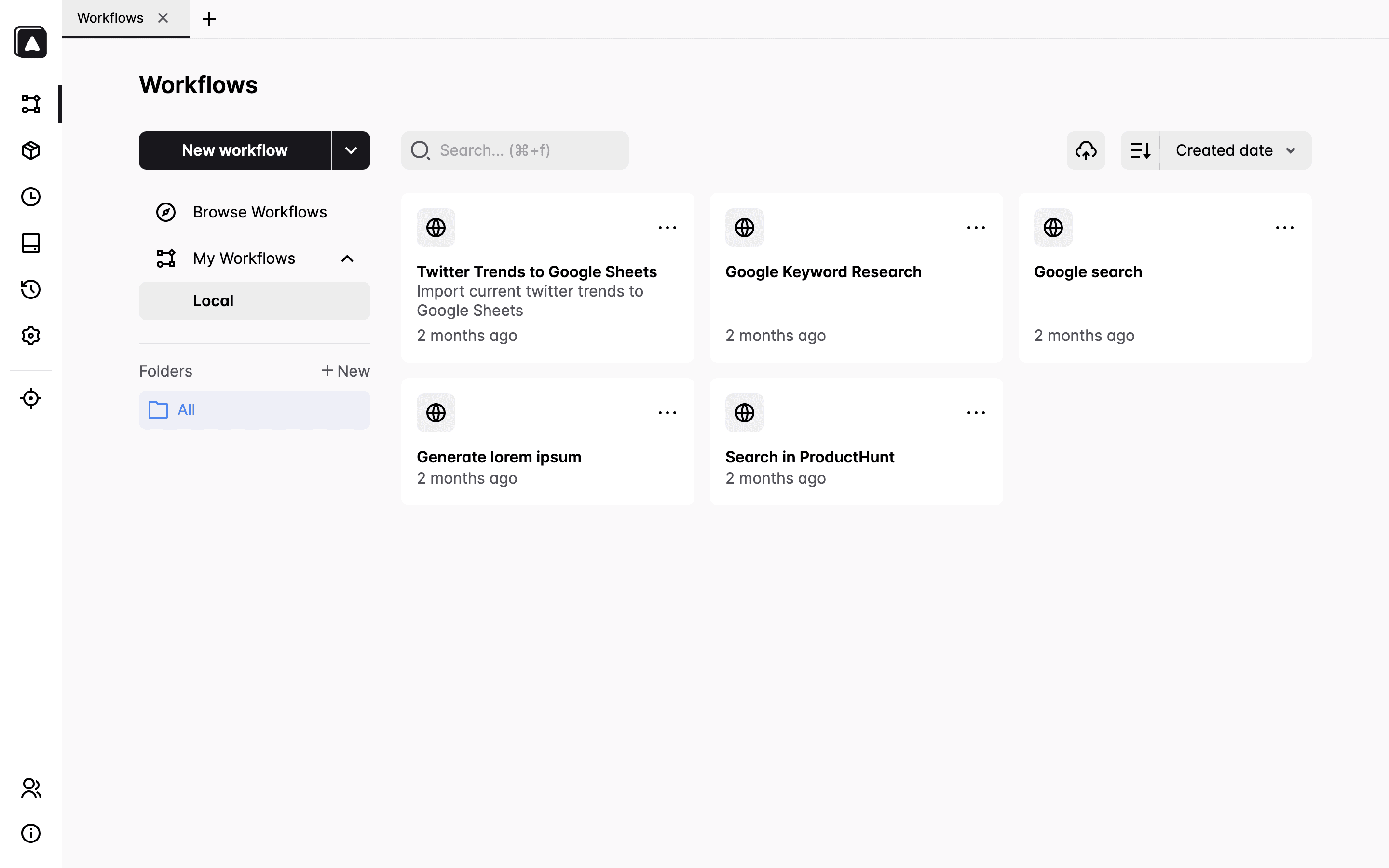
لربط كل شيء معًا، أستخدم مجموعة كاملة من السكربتات المبنية على Automa 1.28. مع الإعداد الصحيح، يمكنك:
جمع مقاطع فيديو قصيرة
تحليل مشاهد الفيديو باستخدام Gemini
إعادة بناء المطالبات باستخدام شخصيات بديلة
توليد الصور تلقائيًا في Dreamina
توليد الفيديوهات تلقائيًا في Kling
تصدير النتائج بتنسيق CSV
لقد أنشأت أيضًا قوالب وسير عمل نموذجية لتقليل وقت البدء. قد يبدو الإعداد معقدًا في البداية، لكن بمجرد أن يصبح في مكانه، تصبح إنتاجيتك بلا جهد.
يمكنك الوصول إلى سكربت الأتمتة في مستودع جيثب التالي:
من خلال دمج الذكاء الاصطناعي مع RPA، تمكنت من تقليل وقت إنتاجي بشكل كبير مع الحفاظ على السيطرة الإبداعية. ساعدتني هذه العملية:
زيادة إنتاج المحتوى بأقل جهد ممكن
توسيع التغييرات من نص واحد
إعادة الاستفادة من الأفكار عبر قنوات ومواضيع متعددة
ليس هذا النظام مقصورًا على قصص الحيوانات الذكية. سواء كنت تصنع مقاطع فيديو ASMR، أو مقاطع تاريخية، أو محتوى تحفيزي - فإن هذا النهج قابل للتكيف.
إذا كنت تستكشف لعبة أتمتة YouTube، آمل أن توفر لك هذه الإرشادات الوقت والإحباط. وإذا كنت عالقًا أو فضوليًا، فلا تتردد في التواصل - أنا سعيد بمشاركة المزيد!